Smear
Intro
Smear is a “Layered Spectral Processor" designed to work with the AU, AAX and VST3 plugin standards, on Windows & Mac OS. This manual serves as a full explanation into every parameter and system featured within the scope of the plugin. It will be updated along with the program itself. Assume that this manual is representing the latest version of the plugin available on our website.
Be sure to check out the Common Features page to learn about capabilities that every Lese plugin has.
Basics
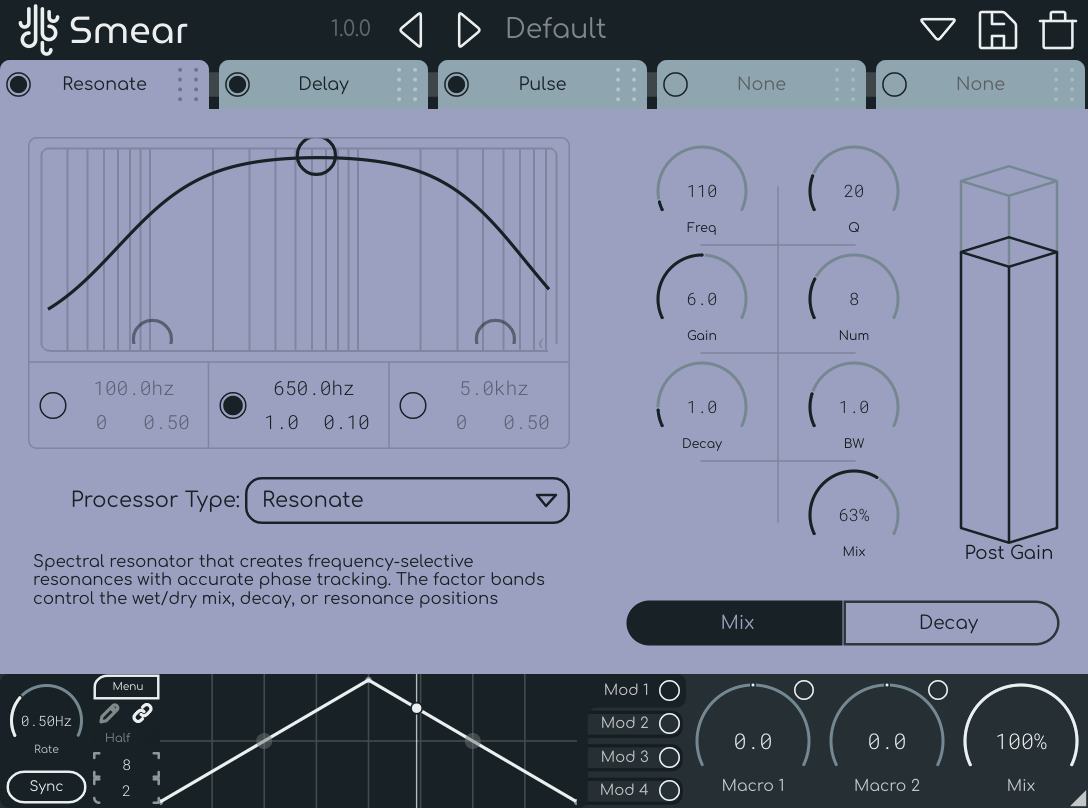
Smear is made up of five different "slots" which can individually hold a spectral processor. there are a number of spectral processors available, adjustable by changing the "processor type" dropdown.
The individual effect processors can be re-ordered, by clicking and dragging on the tabs directly underneath the header. Effects are processed on a left-to-right basis.
Factor Bands
Each individual processor can have various aspects of the processing adjusted differently based on frequency by utilizing the factor bands system. Factor bands are available in other Lese plugins like Sweep and Strum.
In some cases, the factor bands can only have one mode applied to them with a given spectral processor, and that mode is a spectral mix system, which allows you to adjust the mix values on a frequency basis, instead of on the entire spectrum. Additionally, the parameters that adjust factor bands can be modulated.
Parameters
Each smear algorithm is made up of up to 8 parameters, as well as an optional switch to adjust the kind of adjustment that the factor bands are changing.
Algorithms
This is a list of all of the algorithms that Smear has available
Bloom
Bloom is a magnitude-based spectral reverb. Instead of feedbacking whole spectral frames like Blur, each individual bin holds onto incoming energy and lets it decay away over time, smearing sustained sound into a lingering tail. The Size parameter sets how long that tail lasts, and Damping shortens the tail at higher frequencies, similar to how a real room behaves.
Diffusion thickens the tail, and how it does so depends on the Diffusion Mode switch. In "Bins" mode, the tail is spread into neighboring frequencies for a smooth, cloud-like wash. In "Harmonic" mode, the tail's energy is instead fed up the harmonic series of each bin, giving a more resonant, ringing tail. Motion adds a subtle drift to the tail so it doesn't sound static, and Mix sets the dry/wet balance.
The factor bands can control the dry/wet mix, the size (tail length), or the diffusion amount.
Blur
Blur is essentially a kind of spectral reverb, making use of "spectral delay lines" and feedbacking to create a reverb-like effect. The delay time between reflections can be adjusted, as well as the signal feedback. Damping can be adjusted, along with a simple modulation system, allowing for adjusting the depth & rate of the effect.
The factor bands can control the dry/wet mix, the diffusion amount, or the feedback amount.
Chaos
Chaos introduces controlled randomness into the spectrum by randomizing the phase relationships between bins and blending in random noise on top of their magnitudes. Phase Randomization controls how far bin phases are pushed away from their original values, while Noise Amount controls how much of the magnitude is replaced with random noise. The correlation between the left and right channels can also be adjusted with the Stereo Link parameter, widening or narrowing the resulting texture.
The factor bands can control the dry/wet mix, the phase randomization amount, or the noise amount.
Contrast
The Contrast processor can accentuate or hide different peaks that show up in the signal over time. Peak detection is determined by a ratio parameter. The adjustment of the peaks can be smoothed by changing the smoothing parameter. The ratio of enhancement / compression can be changed, and you can switch between "Enhance" mode (accentuating peaks) and "Smooth" mode (smoothing peaks) with the processing mode button.
The factor bands control the dry/wet mix across the spectrum.
Cross
The "Cross" processor makes use of Smear's ability to use a sidechain input to further alter the sound. This processor can act as a multiplier, a ducker, or an emphasizer, but it needs a sidechain input routed to the plugin to work. You can route a sidechain into the plugin the same way that any other plugin would have it's sidechain routed in your DAW of choice.
The effect in this case can be smoothed, as well as have attack & release ballistics applied to it for further adjustment. The factor bands control the dry/wet mix across the spectrum.
Delay
The Delay processor is a relatively simple spectral delay system. The feedback, max delay time, and mix can be adjusted. The factor bands can switch between controlling the delay time, the feedback, or the mix.
Erosion
Erosion is a mix between a spectral reverb and spectral gate. Bins will gradually lose their energy over time based on different decay configurations. Bins that are quiet can erode faster than louder ones, or vice versa.
Fold
Fold applies a wavefolding-style distortion to the magnitude of each bin, generating new overtones and metallic, distorted textures once bins cross a given Threshold. The Fold Mode parameter changes the character of the folding, with Mirror, Wrap, Crush, Invert, and Cascade options available. Amount sets the overall intensity of the folding, Symmetry biases the fold toward one direction, and Harmonics adds extra phase-based overtones on top of the folding process.
The factor bands can control the dry/wet mix, or the fold amount.
Fragment
The Fragment processor works as a relatively simple spectral granulator, taking sections of the spectrum and playing them back based on the incoming parameters. Grains can be repitched, the length of the grains can be changed (Size), along with the density. You can also alter the playback speed, the playback mode, the triggering mode, along with an option to freeze the grain buffer.
A lot of randomness is involved in this process, so in certain parameter configurations you may not hear much sound coming out of it at times.
Gate
The Gate processor uses the factor band values as a threshold for where the individual bins of the spectral frame should mute themselves. This threshold can be flipped with the "Gating Mode" parameter to turn the gate into a sort of "Anti-Gate". The gating can also have attack & release applied to the individual bins so that the cutting-out of individual bins is smooth.
Glitch
Glitch keeps sections of previous spectral frames in it's internal memory and plays them back in different ways. Turning up the probability control adjusts the rate of these changes, and turning up the "Stutter Rate" changes how long these repetitions / playback lengths are. The left & right channels can have their correlation adjusted, to create a further relationship split between the two channels.
Harmonic
The Harmonics processor adds extra harmonics to a given section of the spectrum. The pitch of the harmonics is determined by an internal "pitch tracker", so it works better on monophonic sounds. The amount of harmonics, the gain of the harmonics, the decay, and the harmonic spread can be adjusted, along with a threshold value for changing how the pitch tracker behaves.
Interp
The "Interp", or "Interpolate" processor, smoothly interpolates the magnitudes of bins over time, essentially applying "spectral attack" to the entire spectrum of sound. The smoothing time can be adjusted, either with the factor bands by switching the mode, or uniformly through the smoothing parameter.
Prism
The Prism processor spreads the individual frequency bins of the sound out across the stereo field. Depending on the Pattern parameter, bins can be fanned out from low to high frequencies like light through a prism ("Spectrum"), scattered to fixed, random positions ("Random"), or split into a wide comb by hard-panning alternating bins left and right ("Alternate").
Width sets how far bins travel from the center of the field, Tilt slides the whole field to one side, and Focus pushes bins further toward the extremes for a more separated, exaggerated stereo image.
The factor bands can control the dry/wet mix, the width of the spread, or the tilt of the field.
Pulse
The Pulse processor uses time varying functions to change the volume of different sections of the spectrum over time. The functions can change, and the speed / depth of the effect can be changed. Additionally, the processor can feed back into itself, creating a phaser / flanger type of effect by adjusting the feedback control.
Resonate
The Resonator processor creates frequency selective resonances with accurate phase tracking. The number of resonators can be adjusted, along with the "sharpness" of the tones (Q). The bandwidth and decay can also be adjusted. The frequency of the resonators (along with the harmonics generated) can also be changed, from 20hz to 2khz.
Shift
Shift is a simple pitch shift processor. It can shift the sound up / down by up to two octaves. You can also change the formant shaping of the pitching operation.
As of 1.2, the pitch shifting can also be altered via the factor bands for extra weirdness.
Warp
Warp changes where frequency bins are distributed. The pattern of the warping is adjusted by changing the warp mode parameter. The secondary range parameters (Low and High Clamp) determine the range of the warping, and the center frequency can also be changed. The amount can be turned up & down, and you can adjust the smoothing factor to change how smooth the alterations occur over time.
Modulation

Modulation can add extra layers (four layers to be exact!) of complexity to your sounds in Smear. Please see the Common Features "modulation" section to learn how to work with modulation in Smear.