Teuri
Intro
Teuri is a “Morphing Distortion Mangler" designed to work with the AU, AAX and VST3 plugin standards, on Windows & Mac OS. This manual serves as a full explanation into every parameter and system featured within the scope of the plugin. It will be updated along with the program itself. Assume that this manual is representing the latest version of the plugin available on our website.
Be sure to check out the Common Features page to learn about capabilities that every Lese plugin has.
Basics
Teuri is made up of a selection of different special-made "input preprocessors" which help to colour the sound, before it is fed into a "distortion blending system", which allows for a selection of different audio distorters to be positioned on an XY pad and you can fade between them by changing the location of the "blend" position.
Preprocessors
Biasing
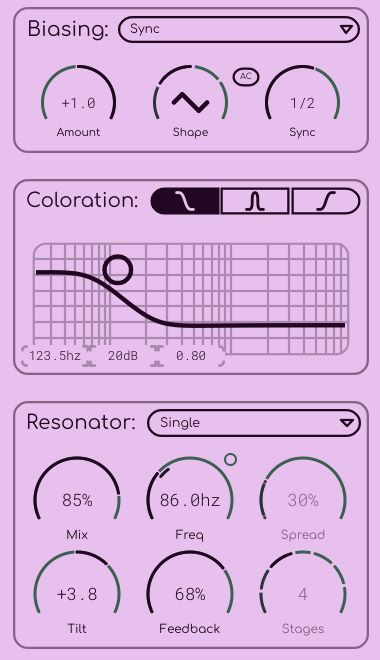
The first processor that sound gets fed through is a biasing system. Biasing essentially adds super-low frequency signals (or even an unmoving DC offset) to the sound, which does not change the sound as-is, but when fed into the distorters later, the sound can slowly morph itself over time, or just beat against the current pitch of the signal (depending on how biasing is configured).
Biasing can either be a constant signal (fixed mode), it can be a free-moving oscillator ("freq" mode), a DAW BPM-synced oscillator (sync mode), dynamically adjusted to the input signal according to a pitch detector (pitch mode), or determined by an incoming MIDI signal (in MIDI mode, on MIDI channel 1)
Note that for pitch detector & MIDI mode, the frequency of the oscillator will continuously be reduced by an octave until the rate is under 10 Hz, so that the biasing oscillator remains inaudible while still maintaining the proper pitch (just at a different octave)
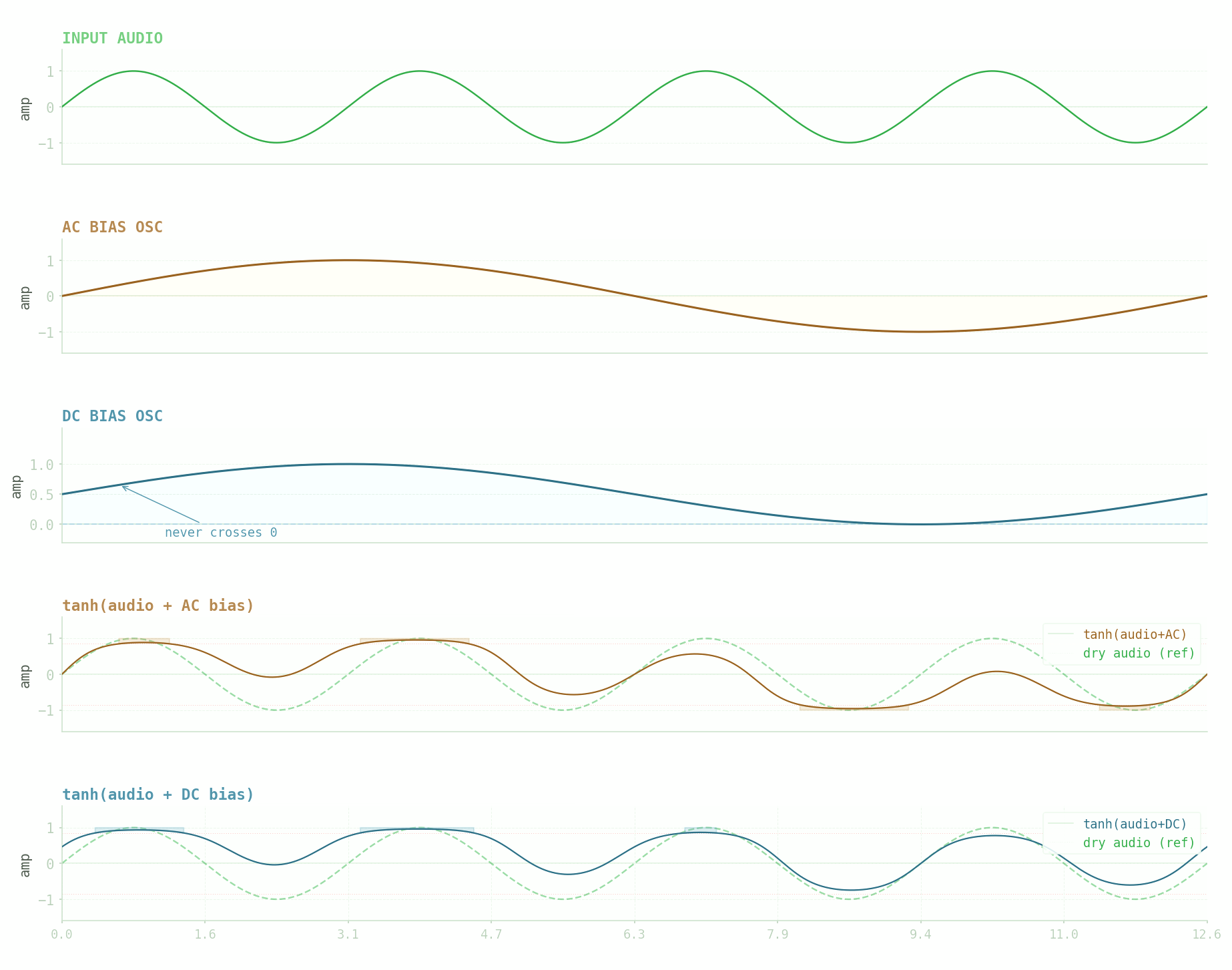
This diagram can help to convey what biasing is doing. In one of the views you have AC mode turned on (where the oscillator cycles from -1/+1), and another where AC mode is turned off (where the oscillator cycles from 0/+1). The distortion applied in this case is pretty simple, but all of Teuri's actual models will behave different from one-another:
Coloration
Coloration is a feature that exists in other Lese plugins as well; essentially, the signal is boosted using a filter, then distortion / wave shaping processes occur, and then the signal is inversely filtered, so that any of the boosting that occurred is removed, but the harmonics added from doing the boosting remain.
Coloration controls are pretty simple, you can control the frequency / Q / gain of the filter, along with what type of filter it is. By default it is a bell filter, but it can also be changed to a low or high shelf.
Resonator
The resonator processor is the final effect before sound is fed into the distortion blender. The resonator can create anything from slight ringing of sound to full-on random morphing & beating depending on it's settings.
Single Pass Mode
The basic controls of the resonator are enabled in "single pass" mode, where only a single resonating filter is applied to the sound. You can adjust the Feedback, Frequency (where increasing the frequency reduces the resonation time, but can resonate at higher frequencies), "Tilt" (which changes internal feedback damping to color the output differently), and the Mix parameter.
Cascaded Mode
The other mode that the resonator can operate in is a "cascaded pass" mode, where multiple resonators are fed into each other in series. The number of passes can be changed with the "Stages" control, and the difference between subsequent passes can be altered with the "Spread" control. Increasing the Stages amount typically makes the resonation more complex, with additional stages "beating against" one another; sometimes cancelling each other out and sometimes adding into each other making the sound output more and more unpredictable.
Keytracking
The center frequency of the resonator can be set based on an incoming MIDI signal. Notes that are fed in (after you route MIDI into the plugin via your DAW)
Distortion
After preprocessing is complete, the sound is then fed into the distortion system. How simple or complex the distortion actually is depends on the configuration of the different distortion nodes available, with up to ten distorters being supported at once.
Distorters are added & removed with the three buttons on top of the cellular distortion view. The "menu" button allows for randomization & distribution of the distortion cell positions. The controls which are visible below the cellular view represent the internal parameters of the last distortion cell that was clicked on, with the XY position, algorithm controls, and mix parameter being adjustable.
Algorithms
This is a full list of the different distortion models that currently are supported in Teuri
Crush
Crush offers sample rate reduction & distortion in one. It has parameters for Intensity (bit depth), Character, and Jitter (s&h bitcrush-style sample rate reduction).
Diffuse
Diffuse is a slight reverb-style distortion, it uses allpass filter networks to give the sound a little bit of a reverb tail. It has parameters for Intensity (feedback gain), Character (delay length scaling), and Jitter (modulation).
Diode
Diode is a solid state diode clipping model. It has parameters for Intensity (input gain), Asymmetry (additional biasing), and Tone (filtering).
Fold
The Fold distorter is a wavefolder with a built-in octaver, giving it the ability to generate additional complex harmonics. It has Intensity (input gain / mix), Timbre (harmonic generation), and Smoothness (wavefolding sharpness) controls.
Fuzz
Fuzz is a classic aggressive distortion model. It has parameters for Intensity (the amount of distortion), Grit (the amount of harmonic texture) and Gate (noise gating)
Lattice
The Lattice model uses an allpass filter network similar to Diffuse, but it uses them in a nonlinear way so that amplitude is preserved but phase is adjusted, causing feedback.
It has a Drive, a Spread, and Feedback gain parameter.
Phase
Phase Distortion is a common method of digital distortion, in this case, we can increase the number of stages (similarly to how the resonator works) to increase the complexity of the phase adjustment, along with the intensity & modulation factors
Ring Mod
The Ring Mod system does simplistic ring mod style modulation against a sine wave, adjusting the Amount & Frequency, along with the Chaos parameter which randomizes the carrier frequency to increase the complex harmonics that ring modulation generates
Shifter
The frequency Shifter is not really a sort of distortion per-se, but it is still an interesting effect. The shifter does linear frequency adjustment with feedback allowing for simple detuning, or metallic sound adjustment. The Amount, Hz, and Feedback parameters can be adjusted.
Tape
The Tape model allows for classic tape-style distortion. It has an Intensity & Hiss parameter. Turning up the Hiss control adds additional gated noise onto the signal.
Transformer
The Transformer distortion system is another classic analog-style distortion processor. Allowing for modelled magnetic distortion. It has an Amount, Hysteresis, and Low End parameter control.
Valve
Valve distortion is a tube-style overdrive model. It has an Intensity and a 'Sag' parameter, which changes the signal's compression.
Warm
Warm is a basic analog distortion system. It has controls for the amount of distortion, the Color, and the Presence (which adjusts the emphasis on the highs & mids)
Blending
All of the algorithms can be loaded into different distortion nodes, and then positioned in 2D space. The "Blend" position can then be dragged to interpolate between the nearby distortion nodes. The blend position can also be modulated.
Modulation

Modulation can add extra layers (four layers to be exact!) of complexity to your distortion in Teuri. Please see the Common Features "modulation" section to learn how to work with modulation in Teuri.